How to Find Your Google Business Review Link and Add It to Feedback Guru
More Google reviews means more trust and more sales. Here is the quick, no-stress way to find your Google review link and add it to Feedback Guru.
More Google reviews = more trust + more sales. Adding your Google review link to Feedback Guru is the fastest way to nudge happy shoppers toward leaving you five-star love. Here's the quick, no-stress way to find that link and drop it into your Feedback Guru dashboard.
Google reviews are one of the top 3 places people check for reviews and you should try to send as many people there as possible to write reviews on your business. Increasing the amount of people leaving you Google reviews is easy with Feedback Guru.
1. Sign In to Your Google Business Profile
- Head to Google Business Profile.
- Log in with the Google account that owns your store or business listing.
Tip: If you don't have a profile yet, you can create one for free. It puts you on Google Search & Maps and unlocks customer reviews. Totally worth the two-minute setup.
2. Click the "See your Profile" Icon
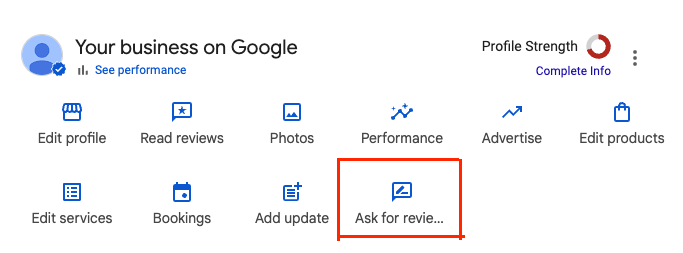
On the right hand side next to your store info there's a "See your profile" button. Click that and it will take you to a Google page with your store information at the top and links to edit and update your profile, as well as a button that says "Ask for Reviews."

3. Click "Ask for Reviews"
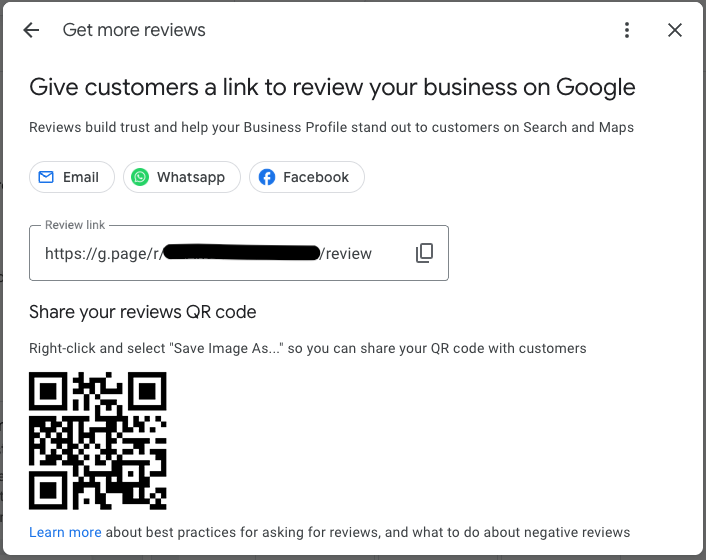
Google pops up a little window with your unique review link. It might also show quick-share buttons (Facebook, WhatsApp, Email). Ignore those for now and grab the raw link.
4. Copy Your Unique Review Link
Hit Copy Link. This URL sends shoppers straight to the star-rating box for your business.
5. Add the Link in Feedback Guru
- Log in to feedback.guru.
- Go to Review Websites in the left sidebar.
- Paste your Google link into an empty URL field.
- Choose what percentage of review traffic you want to send to Google (e.g., 60%).
- Click Save.
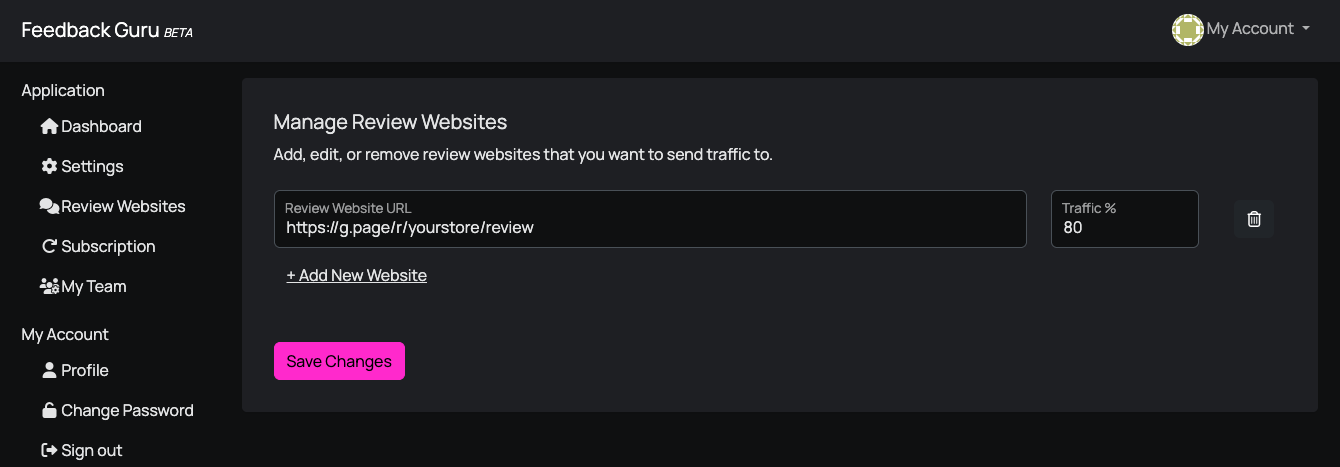
Feedback Guru will now route that share of happy customers straight to Google, so your stars start stacking up.
All Set!
That's honestly it. Super quick. Next time your automated Feedback Guru email goes out, customers who hit the Google option will land right on your review page, no hunting required.
Need more review links? Check out our guide on how to add third-party review websites for every other platform you care about.
Happy collecting, and may the stars roll in!